How do I see my most played tracks in Serato?
Serato DJ Pro counts your plays for you. Since version 2.2.0 there is a Plays column that goes up each time a track plays with its channel fader and the crossfader open, so the fastest way to see your most played tracks is to add that column and sort by it. What the count cannot tell you is when you played a track, which transitions you keep repeating, or how your sets build. For that you need your session history, which Serato keeps one set at a time.
See your most played tracks in Serato
-
Show the Plays columnRight-click the column header in the library and tick Plays. If Custom Crate Columns is on, Plays appears only in the All view at first, so add it to other crates the same way.
-
Sort by PlaysClick the Plays header to sort the library or a crate by play count, highest first. Your most played tracks are now at the top. Sort the other way to find tracks you have never played.
-
Build a most-played smart crateAdd a Smart Crate with a rule on play count (listed as DJ Playcount in Serato DJ Pro 4) so your proven tracks sit in one crate that updates itself.
-
Know what counts as a playA track counts as played when it is playing with its channel fader and the crossfader open. Plays from before Serato DJ Pro 2.2.0 are not included, and the count can be switched off under Setup, Library + Display, Enable Play Count.
-
Export sessions for everything the count can't showThe Plays column has no dates, so for questions like this year's most played or your repeated transitions, export sessions from the History panel. Exports land in the History Export folder inside _Serato_.
-
Analyze the exportsTally exported sessions in a spreadsheet, or import them into Crate Cleaner's Analytics for top tracks by time range, repeated transitions and the BPM arc of each set.
-
Feed what you learn back into cratesYour most played tracks are your reliable weapons, and tracks with zero plays are crate clutter. Use both to tighten gig crates and retire dead weight.
How the Plays column counts
Serato's own rules for a play: with DJ hardware connected, a track counts when it is loaded and playing, its channel fader is open, and the crossfader is open for that deck. In Practice mode the same rules apply to the software faders. A few exceptions are worth knowing:
- Some interfaces can't see your faders. Serato notes that the Rane SL boxes and similar sound cards only mark a track as played once you load another track to a deck.
- The single-deck offline player never counts. Previewing a track there leaves its count alone.
- Older plays are missing. Counting started with Serato DJ Pro 2.2.0, so anything you played before that is not in the number, even though it may be in your history.
- It can be switched off. From 2.5.5, Setup, Library + Display has an Enable Play Count option. If your counts never move, check it.
The column sorts like any other, so a crate sorted by Plays ascending is also the quickest way to spot tracks you have never actually played out.
Where Serato keeps your session history
The Plays column is a running total. Your sessions are the detail behind it: every track you loaded, in order, with times. Where they live depends on your version:
- Serato DJ Pro 4: history moved into the new library database, inside the Library folder at
~/Library/Application Support/Serato. The History panel reads it from there. - Serato DJ Pro 3.x and earlier: history lives in the History folder inside
~/Music/_Serato_.
When you first open Serato 4, it imports your old history into the new database. Serato has a known issue where that import fails, either because the drive has less than about 5 GB free or because the history database is corrupt. Their fix is to free up space, quit Serato, move the com.serato preference files out of ~/Library/Preferences to your desktop, and relaunch so the import runs again.
Because history now sits outside _Serato_, moving to a new Mac means copying both folders. Our guide to moving your Serato library to a new Mac covers the full list. Exporting sessions, and fixing history that is missing, is covered in how to export your Serato history.
What the count and the History panel don't answer
Between the Plays column and the History panel you can see totals and single sessions. What neither gives you is anything over time:
- What were my most played tracks this year, or this summer?
- Which transitions do I keep coming back to?
- How does a typical set of mine build, in BPM?
- Which tracks have dropped out of rotation?
The data for all of that is in your sessions. Serato just shows it one set at a time.
The spreadsheet method
Export each session as CSV from the History panel, combine them into one sheet, and pivot on artist and title to count plays by date range. It works for answering one question once. As a habit it gets old fast, because every gig means re-exporting and re-combining, and the same track appearing with slightly different tags across sessions quietly splits your counts.
The faster route: import sessions into Analytics
Crate Cleaner’s Analytics turns session history into the views the Plays column can't give you:
- Top tracks by time range: your most played records this month, this year, or ever.
- Sessions: every set, browsable, with track counts and timing.
- Transitions: the track-to-track moves you repeat across gigs, which is effectively a map of your own style.
- BPM arc: how each set travels in tempo from open to close.
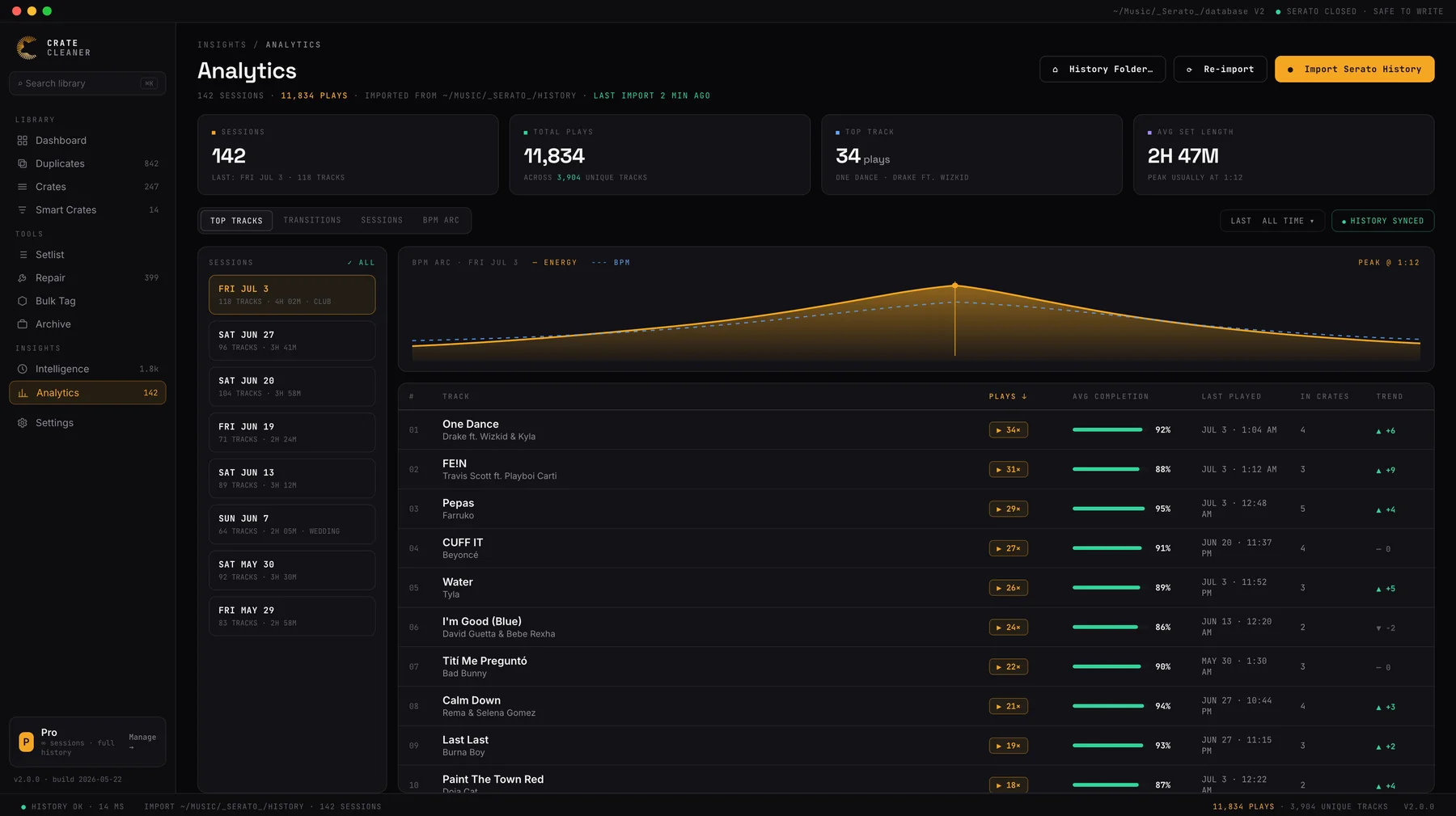
Analytics reads the session exports in the History Export folder inside _Serato_, and the History files Serato 3 and earlier write. On Serato 4, export the sessions you want from the History panel first. Reading Serato 4’s history database directly is on the roadmap. The free plan includes your three most recent sessions with no card required, and Pro and Studio include your full history.
What to actually do with the numbers
Play data is only useful if it changes something. The highest-value moves:
- Build a proven-weapons crate from your most played tracks, or let a play-count smart crate keep it current. When a floor is dying, you want your safest records one click away.
- Audit the never-played. Tracks that have sat in gig crates for a year with zero plays are clutter that slows every search. Retire them to a library crate and keep gig crates lean. Pair this with a proper crate system.
- Steal from yourself. Your repeated transitions are transitions that work. Write the best ones into planned sets instead of hoping you rediscover them live.
- Keep counts honest. Two copies of the same song split its plays in two. Removing duplicates gives each song one true count.
FAQ
Does Serato track how many times I have played a song? Yes. Since Serato DJ Pro 2.2.0 the Plays column counts every play, as long as the channel fader and crossfader are open. Plays from before 2.2.0 are not included, and you can turn counting off under Setup, Library + Display.
Can I make a smart crate of my most played tracks? Yes. Create a Smart Crate with a rule on play count, listed as DJ Playcount in Serato DJ Pro 4, and it fills with tracks above the number you set.
Where is my play history stored in Serato 4? Serato DJ Pro 4 keeps history inside its library database in the Library folder under ~/Library/Application Support/Serato. Serato 3 and earlier kept it in the History folder inside _Serato_.
My history disappeared after upgrading to Serato 4. What happened? Serato 4 imports your old history the first time it runs. Serato lists two causes of a failed import: less than about 5 GB of free space, or a corrupt history database. Free up space, quit Serato, move the com.serato preference files out of ~/Library/Preferences and relaunch to retry the import.
Can I export a set list from Serato? Yes. Select a session in the History panel and export it as text or CSV, ready for tracklist posts or reporting. To turn a set list back into a crate, see how to import a tracklist into Serato as a crate.
Does play history transfer to a new Mac? Yes, if you copy both the _Serato_ folder and, on Serato 4, the Library folder in ~/Library/Application Support/Serato, which Serato says holds your history sessions.
See what you actually play
Crate Cleaner's Analytics turns your Serato history into top tracks, repeat transitions and BPM arcs. Three sessions free on your real library.