How can you tell if an MP3 is really 320kbps?
The bitrate written in a file's tag is only a label, and re-encoding a low-quality file at a higher bitrate never adds back what was thrown away. The reliable test is the frequency spectrum. Every lossy encoder cuts off high frequencies at a ceiling set by its bitrate: a genuine 320kbps MP3 carries content to roughly 20 kHz, while a 128kbps file stops near 16 kHz. If a file claims 320 but its spectrum dies in a hard flat line at 16 kHz, it was built from a 128 and the tag is lying.
Check an MP3 for a fake bitrate with a spectrogram
- Install a spectrum analyzerSpek is free and opens a file in one drag. Audacity works too: import the track and switch the track view to Spectrogram.
- Open the track you want to testYou get frequency up the vertical axis and time along the horizontal one. The top of the image is the high treble, around 20 to 22 kHz.
- Find the cutoff lineLook for the height where the colour stops and everything above is solid black. That flat horizontal edge is the encoder's ceiling.
- Compare the cutoff to the bitrate ladderRoughly: content to 20 to 22 kHz means lossless, about 20 kHz means a real 320, about 19 kHz means 256, about 18.5 kHz means 192, and about 16 kHz means 128.
- Compare that to what the file claimsCheck the bitrate the file reports in Serato or your file browser. If the tag says 320 but the spectrum stops at 16 kHz, you are holding a transcode.
- Rule out the honest exceptionsA hard flat brickwall is an encoder. A gentle fade toward the top is usually the music itself: old masters, vinyl rips and deliberately dark mixes genuinely have less high end.
What a "fake 320" actually is
A fake 320 is a file whose tag claims 320kbps but whose audio was encoded from a lower-bitrate source. Someone took a 128kbps MP3 and re-encoded it at 320. The file gets bigger and the tag looks better, but the audio is still the 128: the frequencies the first encoder discarded are gone permanently, and no re-encode can invent them.
The same trick happens with lossless. A fake FLAC is a lossy file wrapped in a lossless container. It reports as FLAC, takes up 30MB, and still has the frequency ceiling of the MP3 it came from.
Why fakes end up in DJ libraries
- Re-encoding for consistency. Someone batch-converts a mixed library to "all 320" and upscales every low-bitrate file in the process.
- Ripped from video. Audio pulled from a streaming video is often around 128kbps and gets saved as 320.
- Sketchy download sites and old blog links, where the same file has been re-encoded several times as it travelled.
- Record pool mirrors and shared drives, where a file's history is impossible to see.
The cutoff frequency cheat sheet
Encoder ceilings are consistent enough to read at a glance:
- 20 to 22 kHz, no hard edge: genuine lossless (FLAC, WAV, AIFF)
- About 20 kHz: genuine 320kbps MP3
- About 19 to 19.5 kHz: 256kbps source
- About 18.5 kHz: 192kbps source
- About 16 kHz: 128kbps source
- Below 16 kHz: 96kbps or worse
Read the ceiling, then compare it to the claim. The gap between the two is the lie.
Brickwall or natural roll-off?
This is where most people get false positives, so it is worth slowing down. An encoder cutoff is a brickwall: a straight horizontal line with detail below it and pure black above, in the same place for the whole track. Natural high-frequency loss is a roll-off: energy thins out gradually, varies with the music, and has no hard edge.
Genuinely dark records exist. A 1970s soul record, a vinyl rip, or a deliberately murky dub mix can look quiet up top and still be a perfect file. If there is no flat line, do not call it fake. Files with a low sample rate are another false alarm: a 32 kHz file physically cannot contain anything above 16 kHz, so its ceiling proves nothing about the bitrate.
Does it actually matter for DJing?
In headphones on a laptop, a good 128 and a real 320 can be hard to separate. On a club system the difference shows up where it hurts: cymbals and hi-hats lose air and turn splashy, reverb tails collapse, and the missing top end makes the mix sound flat next to the record that follows it. Club limiters and big rooms exaggerate encoding artefacts rather than hiding them. If you play on serious systems, transcodes are worth finding.
Checking a whole library instead of one file
The spectrogram method is sound but it is one file at a time, and nobody is opening 20,000 tracks in Spek. Batch analysis applies the same test automatically: sample each track, find the cutoff, map it to a source bitrate, and compare that to the claim. To check a few files without installing anything, drop them into the free MP3 quality checker, which runs the same test in your browser.
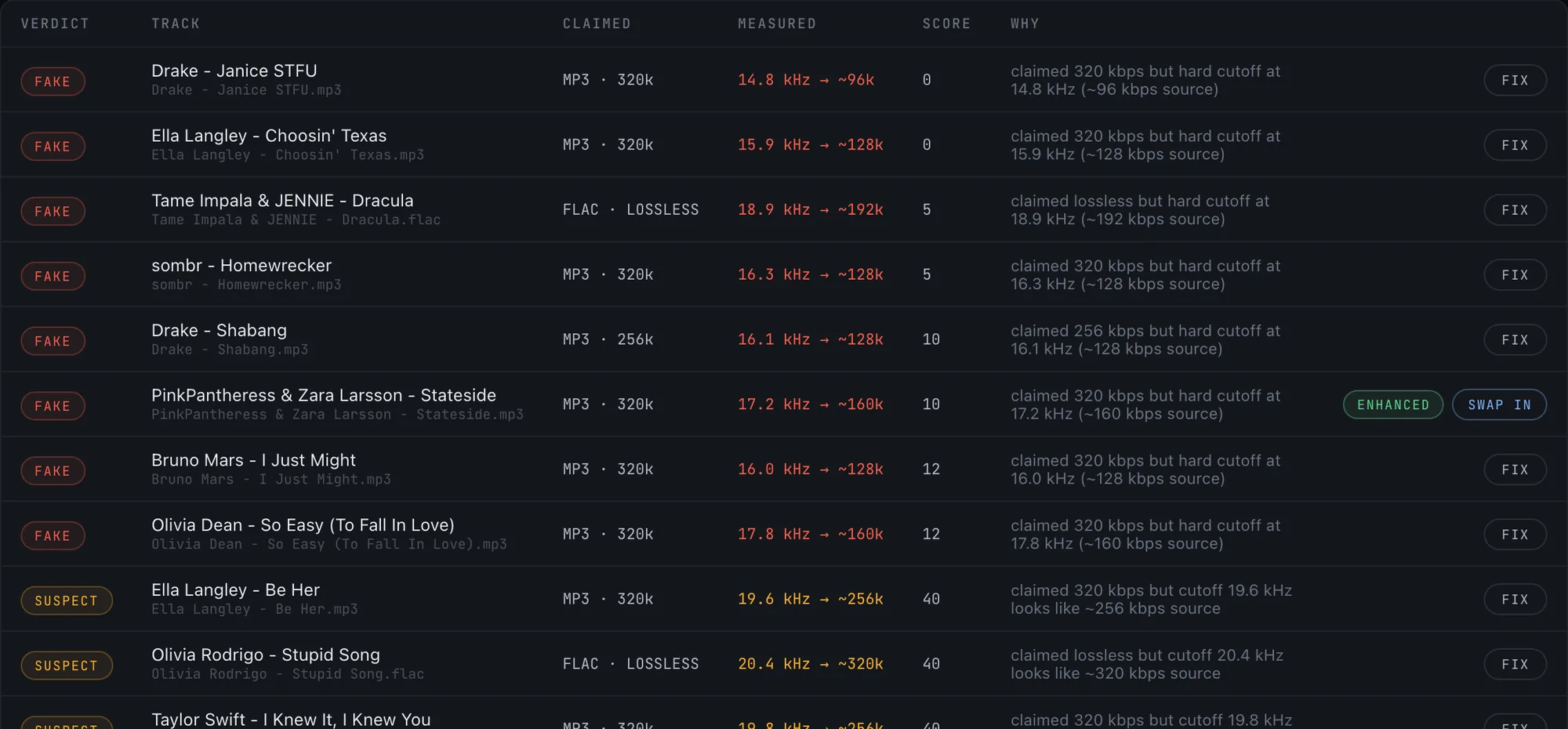
Crate Cleaner's audio quality scan does exactly this across your library and sorts everything into clean, warning, suspect and fake, with the measured cutoff shown against the claimed bitrate for every flag so you can check its work. It is deliberately conservative: gradual roll-offs are capped at a warning rather than called fake, and low-sample-rate files are never punished for frequencies they cannot physically hold.
What to do with the fakes you find
Replace the ones you can. A real copy from a store or record pool is always the right answer for a track you play often. For the rest, decide whether the file is worth keeping: repair can fix clipping and loudness and freeze the result losslessly, but it cannot restore frequencies the original encoder deleted. Honest expectations here save disappointment: repair improves a fake, it does not un-fake it.
Frequently asked questions
Does a fake 320 actually sound worse?
Yes, though how obvious it is depends on the system. On a club rig the missing high end shows up as splashy cymbals, collapsed reverb tails and a flat top end next to a genuine file. On laptop speakers it can be almost inaudible.
Can you fix or restore a fake 320?
Not truly. Frequencies removed by the first encoder are gone and cannot be recovered. You can repair clipping and loudness and stop further degradation by saving losslessly, but the only real fix is replacing the file with a genuine copy.
Does Serato show the real bitrate?
Serato shows the bitrate the file reports, which is exactly the number a transcode fakes. That is why spectral analysis is the only reliable check.
Is a bigger file always better quality?
No. File size follows the bitrate written at encode time, so an upscaled 128 produces a large file with small-file audio. Size proves nothing on its own.
What is a fake FLAC?
A lossy file placed in a lossless container. It reports as FLAC and takes up lossless-sized space while carrying the frequency ceiling of the MP3 it was made from. The same spectrogram test exposes it.
Find every transcode in your library
Crate Cleaner scans your whole library for fake 320s and fake lossless files and ranks what to replace first. Free plan on your real library.