How do you turn a Spotify playlist into a Serato crate?
You cannot import Spotify audio into Serato DJ Pro. Spotify tracks are encrypted streams, not files on your drive, so no DJ software can load them. What you can do is rebuild the playlist from your own music: take the playlist's track list, match each title and artist to a file you already own, and build a crate from the matches. You can do that by hand with a CSV export, or let Crate Cleaner read the playlist and match it against your library for you.
Rebuild a Spotify playlist as a Serato crate
- Get the playlist out as textSpotify has no built-in export, so use a playlist exporter such as Exportify to sign in and download the playlist as a CSV of titles, artists, albums and durations. That metadata is the only thing that transfers legitimately, and it is all you need.
- Keep artist, title and durationDuration is the column that saves you later, because it separates a radio edit from an extended mix when the two titles look identical. Keep it even if you throw away everything else.
- Match each track to a file you ownSearch your library for every line and mark what you already have. This is the slow part by hand and the part worth automating, because it is the same comparison repeated a few hundred times.
- Check the version, not just the titleConfirm you matched the same edit: clean against explicit, radio against extended, original against remix. A duration within about two seconds is the fastest confirmation you will get.
- Build the crateCreate a crate in Serato named after the playlist and add every confirmed match. Your existing cues, beatgrids and key data come with the files, because they live in the files.
- Keep the gaps as a buy listAnything that did not match is a record you do not own. Save that list under the playlist name so you can fill the holes before the gig instead of discovering them during it.
Why you cannot import Spotify tracks directly into Serato
This is the first thing to get straight, because it saves hours of searching for a converter that does not exist. Spotify does not give you audio files. Tracks are delivered as an encrypted stream and are licensed for playback inside Spotify's own apps. Serato DJ Pro loads files from your drive, so there is nothing for it to load.
That is also why Spotify's old DJ-software integration disappeared. Serato, rekordbox and others dropped streaming support for offline DJing, and any tool promising to convert Spotify to MP3 is either stripping DRM, which breaks Spotify's terms, or recording the output at low quality.
What transfers legitimately is metadata: the artist, title, album and duration of every track in the playlist. That is enough to rebuild the playlist from music you own.
Three ways to rebuild a Spotify playlist in Serato
1. By hand with a CSV export
Free and reliable, but slow. Export with a tool like Exportify, then search your library for each line. Fine for a 20-track playlist, punishing for a 200-track one.
2. Generic playlist converters
Services that move playlists between streaming platforms are built to match Spotify to Apple Music or Tidal, not to your local files. They cannot see your drive, so they cannot tell you which tracks you already own, which is the only question that matters here.
3. Matching against your own library automatically
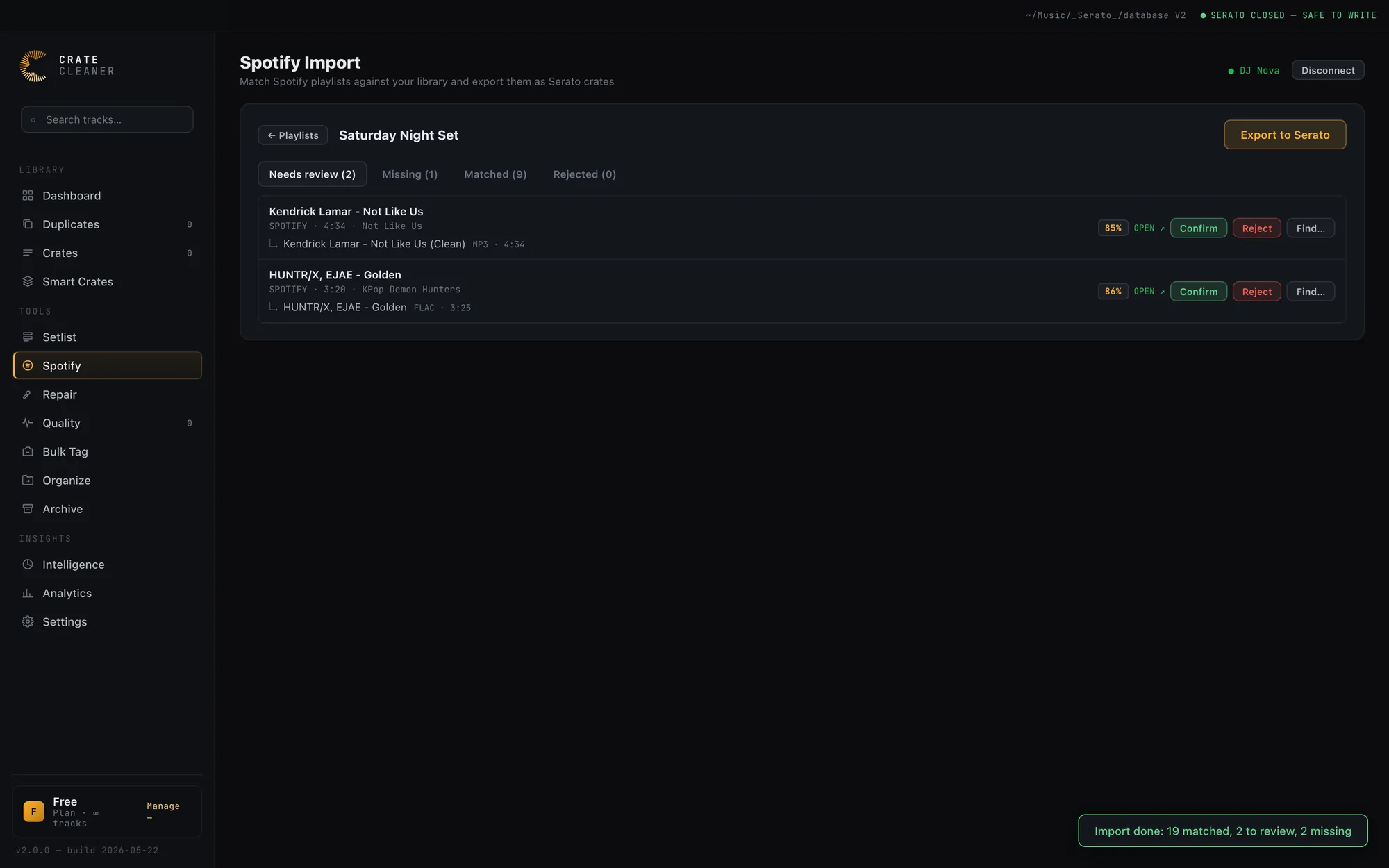
A Serato-aware tool reads the playlist metadata, compares it to the files already in your library, and writes a real crate from the confirmed matches. The tracks you do not own come back as a list instead of silently disappearing. Crate Cleaner's Spotify Import is built for exactly this.
Doing it with Crate Cleaner
Connecting your Spotify account
There is a one-time setup step before you start. Spotify limits apps it has not approved to five users, and it only approves registered businesses with at least 250,000 monthly active users, so no small DJ tool can ship one shared Spotify app. Instead you create your own. It takes a couple of minutes, and from version 2.5.6 the Spotify Client ID section in Crate Cleaner's Settings walks you through the same steps:
- Log in to Spotify's developer dashboard with your Spotify account. Spotify requires the owner of a personal app to have Premium.
- Create an app with any name and description, tick Web API, and add
http://127.0.0.1:7337/api/spotify/callbackas a Redirect URI. Settings has a Copy button for it, so there is nothing to retype. - Open the app's settings, copy its Client ID (not the Client Secret) and paste it into the Spotify Client ID field in Crate Cleaner's Settings. Crate Cleaner checks the format as you paste, so a Client Secret or a partial copy is caught before you save.
- Open the Spotify page in Crate Cleaner and hit Connect Spotify.
A Spotify Client ID is not a secret, and Crate Cleaner never asks for the Client Secret. The app is yours alone, so the five-user limit never gets in your way.
Playlists you follow
Personal Spotify apps can only read the tracks of playlists you created or collaborate on, plus your Liked Songs. Playlists you follow, including Spotify's own editorial playlists, come back without their tracks, so they cannot be imported directly. Crate Cleaner marks them with a FOLLOWED tag in your playlist list, and if you import one anyway, it tells you afterwards which playlists Spotify withheld, with a shortcut to Import List. The fix takes seconds: in Spotify, select all the tracks in the playlist, add them to a new playlist of your own, and import that copy. If you already have the tracklist as a CSV or text, Import List runs it through the same matcher.
What the matching actually does
Pick a playlist and Crate Cleaner pulls its track list and compares every entry against the files in your library. The comparison is deliberately cautious, because a wrong match is far more expensive than a missed one:
- A match is only accepted automatically when it scores 0.92 or higher and the two durations are within two seconds of each other. Title agreement alone is never enough.
- Anything scoring above 0.60 goes to a review queue where you confirm, reassign or reject it one at a time.
- Below 0.60 the track is reported as missing rather than guessed at.
- Version words are treated as disqualifying, not decorative. A remix, an instrumental or a clean edit will not quietly match the original.
Confirmed matches become a Serato crate with your existing BPM, key, cue points and waveforms already attached, because all of that lives in the files you already analysed. Nothing is re-analysed and no audio is downloaded.
What it costs
Connecting Spotify, matching a playlist and working through the review queue are free, because that is you reconciling your own collection and you should be able to see the answer before paying for anything. Writing the finished crate into Serato is a Studio feature. The same is true of Import List, which takes a pasted tracklist, CSV or M3U through the same matcher when the playlist did not come from Spotify.
Where playlist matching usually goes wrong
- Versions. "One Dance", "One Dance (Extended Mix)" and a clean edit are three different records to a DJ. Title-only matching will happily put the wrong one in your crate.
- Featuring artists. "Drake feat. Wizkid" and "Drake, WizKid & Kyla" are the same record spelled two ways, and sometimes the feature is buried in the title instead of the artist field.
- Messy local tags. A file named
01 - final FINAL2.mp3with empty tags will not match anything on title alone. If a lot of your library looks like this, cleaning up the tags first pays for itself immediately. - Duration drift. Duration is the best tiebreaker you have, but an extended mix is legitimately longer, so treat a mismatch as a question rather than a rejection.
The safe rule: a missed match costs you nothing but a line on a buy list, while a wrong match quietly puts the radio edit in a peak-hour crate. Bias toward asking rather than guessing.
What to do with the tracks you do not own
The gaps are the useful half of the exercise. A 60-track playlist that matches 41 files is telling you precisely which 19 records stand between you and playing that set, which is a far better buy list than browsing a store's front page. Crate Cleaner links each missing track straight out to the stores DJs actually buy from, prefilled with the artist and title, so the list is something you can work through rather than retype.
It is also worth checking the matches you did get. If a playlist keeps matching to files you know are low quality, that is a transcode problem rather than a matching problem, and it is better to find it now than in a booth.
Frequently asked questions
Can you play Spotify tracks in Serato DJ Pro?
No. Spotify audio is an encrypted stream licensed for Spotify's own apps, and Serato loads files from your drive. Streaming integrations for offline DJ software were discontinued, so the practical route is to rebuild the playlist from music you own.
Does Spotify have a playlist export?
Not natively. Third-party exporters such as Exportify sign in with your Spotify account and produce a CSV of titles, artists, albums and durations, which is the metadata you need to match against your library.
Will matching a playlist download the songs?
No. Matching reads playlist metadata only and links to files you already own. Any tool offering to download Spotify audio is working around DRM, which breaks Spotify's terms.
Why does Crate Cleaner ask for a Spotify Client ID?
Spotify limits apps it has not approved to five users, and it only approves registered businesses with at least 250,000 monthly active users, so Crate Cleaner cannot ship one shared app. You create your own on Spotify's developer dashboard (the account that owns it needs Premium), add http://127.0.0.1:7337/api/spotify/callback as a Redirect URI, and paste the Client ID into Settings. It is a one-time step, and a Client ID is not a secret.
Why can't I import a playlist I follow?
Spotify only lets personal apps read the tracks of playlists you created or collaborate on, plus your Liked Songs. Playlists you follow, including Spotify's editorial ones, come back without their tracks. In Spotify, select all the tracks and add them to a new playlist of your own, then import that copy. If you already have the tracklist as a CSV or text, Import List matches it the same way.
What does it cost?
Connecting Spotify, matching a playlist against your library and reviewing the results are free, because that is you reconciling your own collection. Writing the finished crate into Serato is a Studio feature.
What about Apple Music, Tidal or SoundCloud playlists?
The same principle applies: get the track list as text, then match it against your local files. Crate Cleaner's Import List takes a pasted list, CSV or M3U from any source and runs it through the same matcher. For Apple Music specifically, see turning an Apple Music playlist into a Serato crate.
How accurate is automatic matching?
On a well-tagged library most tracks match outright. Crate Cleaner only auto-accepts a match scoring 0.92 or better with durations within two seconds of each other, sends anything above 0.60 to a review queue, and refuses to guess below that. Badly tagged files are the limit: a track with empty tags cannot be matched on title.
Rebuild any playlist as a Serato crate
Crate Cleaner matches Spotify playlists against the music you already own and shows you what is missing. Free to match and review on your real library.