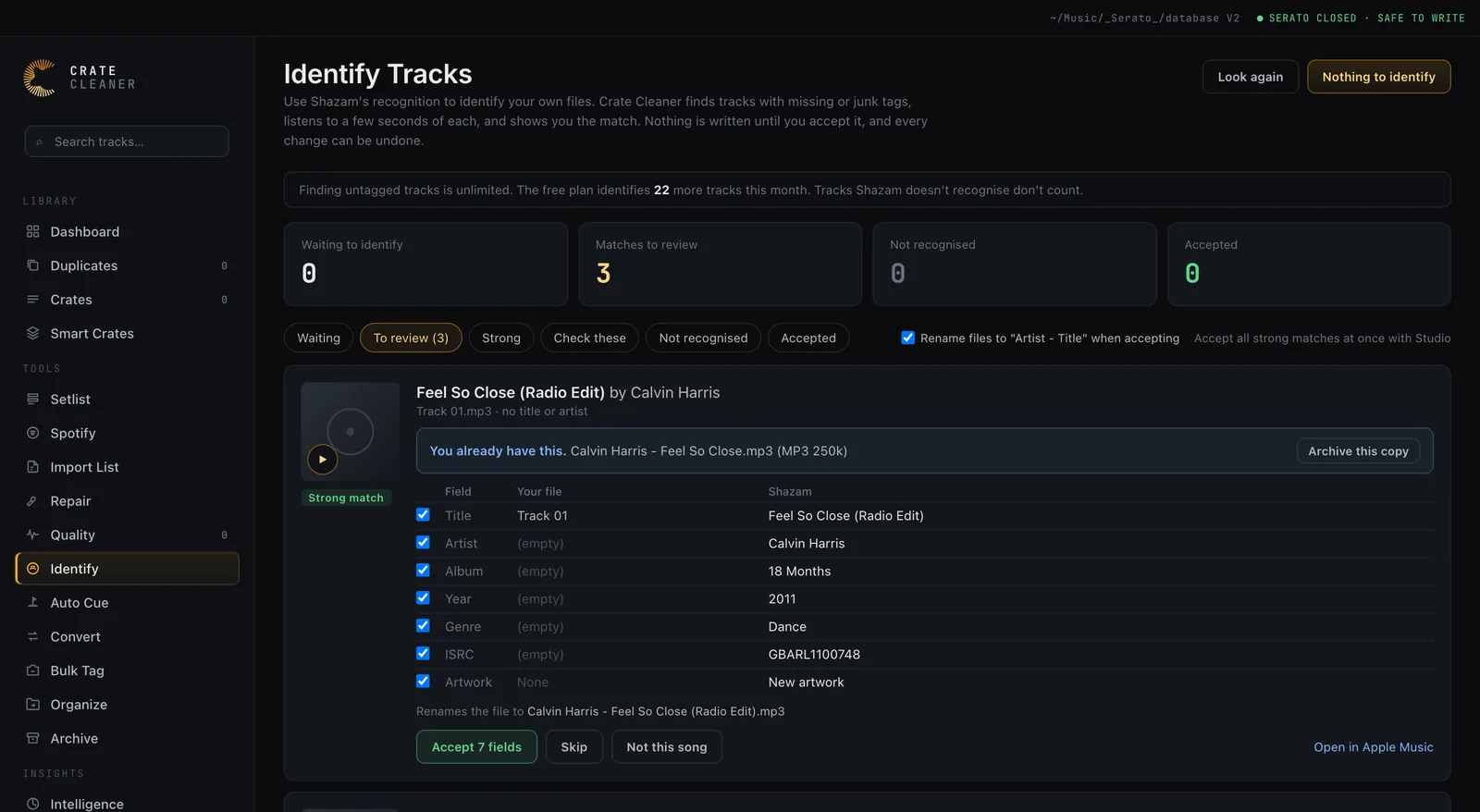
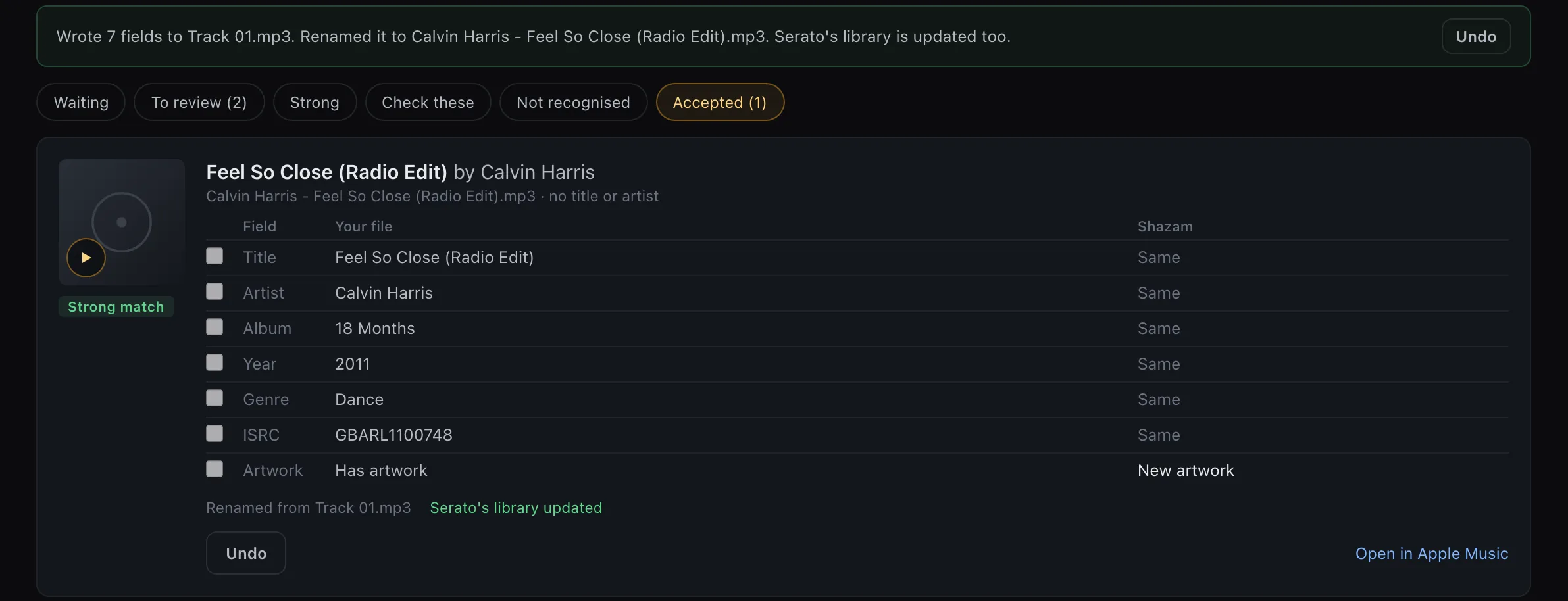
Every DJ library has them: files called Track 01, songs by Unknown Artist, titles full of download-site junk. Crate Cleaner finds them, uses Shazam’s recognition to work out what each one really is, and shows the artist, title, album, year, genre, ISRC and cover art next to what your file has now. You accept only what you want, and Serato shows the new tags straight away.
macOS 12 or later · 25 free identifications a month · Nothing written until you accept
23%
Of tracks in one working DJ’s 85,000-song library had missing or junk tags
7
Fields filled: artist, title, album, year, genre, ISRC, artwork
0
Tags written before you accept
25
Free identifications a month; only recognised tracks count
Find
Every track with missing or junk tags, found in one pass
Crate Cleaner reads the tags inside every file in your library, not just the name Serato shows, so a song Serato labels with its file name is still caught. Finding them is free and unlimited, and nothing is changed while it looks.
No title or no artist in the file at all
Placeholder tags like Track 03, Unknown Artist, Untitled or Pista 5
Download-site junk in the tags: web addresses, “free download”, “promo only”
The whole file name stuffed into the title, artist and all
The results land on a Waiting list you can filter by reason and search by file, folder, title or artist. Tick the tracks you want to identify, or right-click any track in Crate Cleaner and choose Identify with Shazam.
Identify
Shazam’s recognition, run on your own files
For each track you pick, Crate Cleaner listens to about 12 seconds from a third of the way in, past the drum intro a DJ edit often opens with, and tries a second spot if the first one is not recognised. It matches against the Shazam catalog through Apple’s ShazamKit, then fills in the album and year from Apple’s music catalog.
The audio never leaves your Mac: only a short audio signature goes to Apple’s Shazam service
MP3, M4A, FLAC, AIFF and WAV
Cover art at 1000 pixels, embedded in MP3, M4A, FLAC and AIFF files when you choose it
Tracks Shazam does not recognise are free and wait on their own list for another try
Review
You choose every field before anything is written
Each match is a card with your file’s current tags on one side and the match on the other. A good tag you already fixed by hand is never replaced unless you tick it.
Safe by default
Only empty or junk fields are ticked
The fields your file is missing come pre-ticked. A field that already holds a real value is shown but left unticked, so a match cannot quietly overwrite your work.
DJ edits
Remixes and edits get flagged
The catalog often has the original but not the club edit you own. When your file names a version the match does not, or the lengths differ, the card says Check this and only the artist is pre-ticked.
Listen
Hear it before you accept
Every match and every waiting track has a play button that opens the preview player, plus the usual right-click menu. Each match also links to the song in Apple Music.
Duplicates
Spot the copies you already own
Junk-tagged files are often second copies of songs that are properly tagged somewhere else in your library. Once a track is identified, Crate Cleaner compares it with everything you have by artist, song and version. If you already own that version, the card says so, with the file’s format and bitrate, and offers to archive the untagged copy instead. Archived files stay in the Archive until you restore or empty it. Other versions you own, like the extended mix, are listed for reference.
Serato
Serato shows the new tags straight away
Serato keeps its own copy of every track’s title and artist, so a tag editor’s changes usually stay invisible until you run Rescan ID3 Tags. When you accept a match, Crate Cleaner updates Serato’s library too, while Serato is closed and after a backup. If Serato is open, the change waits until you quit it.
Cues, loops, beatgrids and ratings stay put: only the tag fields change
Rename the file to “Artist - Title” if you want, and your crates follow the new name
Undo puts everything back: the tags, the file name and Serato’s library
Built for Serato DJ Pro 4’s library, and the older database file is updated too
How it works
Find, identify, then accept what you trust
Find untagged tracksOne click reads the tags in every file and lists the ones with missing or junk tags. Free and unlimited.
Identify the ones you pickTick tracks, filter by reason, or identify the first batch. Shazam matches come back with album, year and artwork.
Review and acceptTick the fields you want, optionally rename the file, and accept. Serato’s library follows, and every change can be undone.
Plans
What the free plan covers
Finding tracks with missing or junk tags is unlimited on every plan. The free plan identifies 25 tracks a month, and tracks Shazam does not recognise do not count against it. Accepting a match, renaming and undo are free too. Pro and Studio identify without a limit, and Studio adds accepting every strong match in one go.
FAQ
Questions about Identify Tracks
Does Identify Tracks upload my music?
No. Crate Cleaner makes a short audio signature of each track you choose, on your Mac, and sends only that to Apple’s Shazam service. Your audio files, your library and your tags stay on your Mac.
Will it overwrite tags I have already fixed?
Not unless you tick them. Only empty or junk fields come pre-ticked, nothing is written until you click Accept, and Undo puts the original tags back.
What happens with remixes, edits and clean versions?
The Shazam catalog often has the original release but not every DJ edit. When your file names a version the match does not, or its length is far from the catalog’s, the card is marked Check this and only the artist is pre-ticked. Not this song discards a wrong match.
Will my Serato cue points and beatgrids survive?
Yes. Crate Cleaner only changes the tag fields you tick. The cue points, loops, beatgrid and rating Serato stores in the file are left exactly as they were.
Do I still need Rescan ID3 Tags in Serato?
Usually not. Crate Cleaner writes the new title, artist, album, genre and year into Serato’s own library while Serato is closed, after backing it up. If Serato’s library cannot be updated safely, the app says so, and Rescan ID3 Tags in Serato does the rest.
Which file formats does it work with?
MP3, M4A (AAC and Apple Lossless), FLAC, AIFF and WAV. Cover art is embedded in every format except WAV.
Does it need an internet connection?
Identifying does, because matching happens against the Shazam catalog. Finding untagged tracks and reviewing the matches you already have work offline.
Is Identify Tracks free?
Finding tracks with missing or junk tags is free and unlimited. The free plan identifies 25 tracks a month, and tracks that are not recognised do not count. Pro and Studio identify without a limit.
Is this an official Shazam app?
No. Crate Cleaner uses Apple’s ShazamKit, the recognition technology Apple offers to app developers. It is not affiliated with or endorsed by Apple.
Find out how many unknown tracks you have
Finding them is free and unlimited, and the first 25 identifications every month are on us.