How do you set hot cues automatically in Serato?
Serato DJ Pro does not set hot cues for you. It analyses your tracks for BPM and a beat grid, but placing the cues is a manual job you do one track at a time. That is fine for tonight's ten records and hopeless for a library of thousands. This guide covers both halves: how to set cues by hand so they land on the beat, and how to auto-place them across a whole library with a Serato-aware tool that you still review before anything is written.
Set hot cues manually in Serato
- Analyse the track firstRun Serato's analysis so the file has a beat grid and BPM. Cues you set before the grid exists will not snap cleanly to the beat.
- Turn on Snap and QuantizeEnable Snap and Quantize in Serato so a cue you drop near a beat locks to the nearest one instead of landing a fraction early or late.
- Set your start cue on the first downbeatFind the first strong beat where the track really begins and set Hot Cue 1 there. This is the cue you reach for most, so it has to be exact.
- Mark the structure, not every barPlay through and set cues at the points that matter to a mix: the end of the intro, the drop or main groove, the breakdown, and the start of the outro.
- Keep colours and names consistentUse the same colour and slot for the same job on every track, for example slot 1 for the start and a fixed colour for the drop, so your muscle memory works under pressure.
- Repeat for every trackSerato sets cues one file at a time, so this is the slow part. To cue a whole library you either work through it track by track or let a tool propose cues in batch.
Why Serato has no "auto cue" button
Serato analyses audio to build a beat grid and read the BPM, and some versions read the key, but it stops there. It never decides where your hot cues belong, because that is a musical judgement: the start you drop into, the drop you cut to, the breakdown you ride out. Those are the DJ's calls, not the analyser's, so Serato leaves all eight hot cue slots empty and waits for you.
The result is that cueing does not scale. A working DJ can easily carry several thousand tracks, and setting even three or four cues on each by hand is days of clicking. That is the gap an automatic cue tool fills: it proposes the obvious cues so you only have to correct them, instead of building every one from nothing.
Where a hot cue should actually go
Getting cues placed automatically only helps if they land in the right places. Three rules cover most of it.
On the downbeat, every time
A cue half a beat off is worse than no cue, because you cannot trust it live. This is why Snap and Quantize matter when you cue by hand, and why any automatic tool has to build on Serato's own beat grid rather than a tempo it guessed from scratch.
On phrase boundaries, not random beats
Dance music is arranged in 4-bar and 8-bar phrases. The moments you want to jump to, the drop, the breakdown, the final chorus, sit on those boundaries. Cues placed on phrase lines let you drop in and stay in time; cues placed a bar and a half early do not.
Where the energy changes
The useful cues mark a change in the track. A breakdown keeps its melody but loses its drums, so the low end is the honest signal: watch where the bass steps up or drops out, not where the track is simply loudest. That is exactly what a good auto-cue engine keys on.
Where auto-cueing usually goes wrong
- Off-grid cues. Any tool that ignores Serato's beat grid will drift, and an off-beat cue is useless in the booth. The grid has to be the foundation.
- Overwriting your work. The cues you set by hand are the ones you trust most. A tool that renumbers or moves them, or fills a slot you already used, does more harm than good.
- Collateral damage to loops and BPM lock. Serato keeps hot cues, saved loops, track colour and BPM lock in one block of tag data. A tool that understands only cues can wipe the rest when it writes.
- No way back. Cues written across thousands of files with no undo is a bad trade. You want a batch you can reverse in one move if you do not like the result.
The safe rule is the same one that applies to any bulk edit of your library: review before you write, change only what you meant to, and keep a way to undo the whole thing.
Doing it automatically
Crate Cleaner's Auto Cue is built around those rules. It reads Serato's own beat analysis, pins the first cue to the first downbeat Serato found, and snaps the rest to 4-bar phrase boundaries where the low end lifts. Every proposal carries a confidence score, so across a whole library you can accept only the strong ones, or take everything on a track you know by ear.
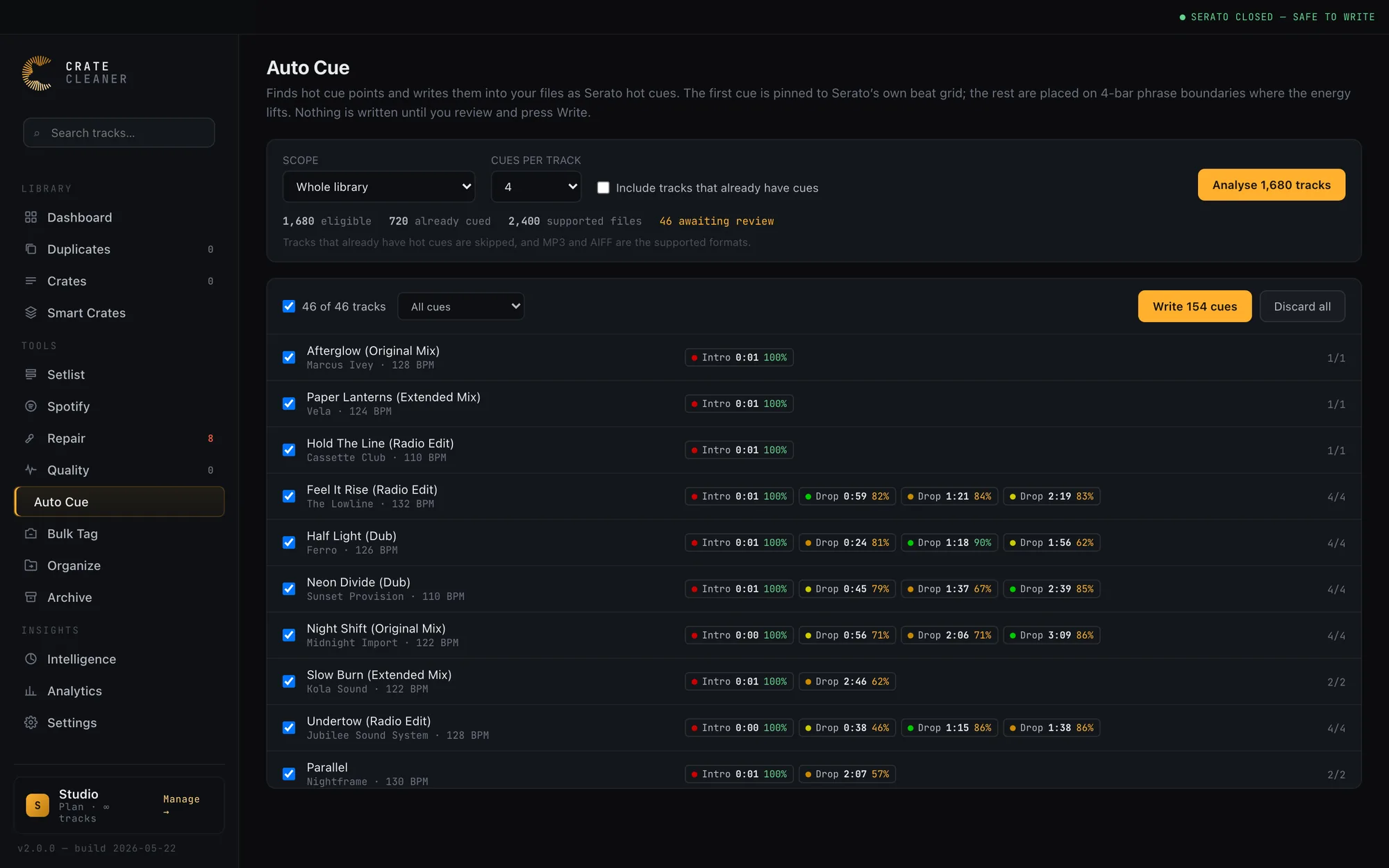
Nothing is written until you say so. Analysing and writing are separate steps: proposals appear on the waveform as dashed markers, clearly different from the solid cues already in the file, and you drop the ones you disagree with before writing the rest. It only ever fills empty slots, so cues you placed yourself are never moved or renumbered, and your saved loops and BPM lock are written back untouched. Every batch is copied first and reverses in one click. Serato has to be closed while it writes, because Serato would otherwise write its cached tags back over the new cues when it quits. Today the cue writer supports MP3.
Frequently asked questions
Can Serato set hot cues automatically?
Not on its own. Serato DJ Pro analyses your tracks for BPM and a beat grid, but it does not place hot cues for you, so cueing inside Serato is a manual, one-track-at-a-time job. Automatic hot cues across a library come from a third-party tool that reads Serato's grid and writes cues back into the file.
Where should a hot cue go?
On a downbeat at a point where the arrangement changes. The first cue belongs on the first real beat of the track, and the rest belong on 4-bar or 8-bar phrase boundaries such as the drop, the breakdown and the outro. A cue placed off the beat is worse than no cue, because you cannot trust it in a live mix.
Will auto-setting cues overwrite the cues I already placed?
It should not, and a safe tool will not. Crate Cleaner's Auto Cue only ever fills empty hot cue slots. It never moves or renumbers a cue you set, and a proposal that lands on a spot you already cued is dropped rather than duplicated. Before trusting any tool with a batch, confirm it leaves existing cues, saved loops and BPM lock untouched.
Which file types can store Serato hot cues?
Serato stores hot cues in the file's tag data: the ID3 tag on MP3, and equivalent tag blocks on AIFF, FLAC and others. Crate Cleaner's Auto Cue writes cues to MP3, the format its cue writer is verified against, and reads other formats without writing to them.
Do I need to close Serato before writing cues in bulk?
Yes. Serato caches tag data in its own database and writes it back when it quits, so cues written to a file underneath a running Serato get overwritten. Close Serato before any batch write, and reopen it afterwards to read the new cues in.
Cue your whole library in one pass
Crate Cleaner's Auto Cue proposes hot cues on the beat grid and on 4-bar phrases, you review every one, and any batch undoes in a click. Free plan on your real library.