Know what fits after this track.
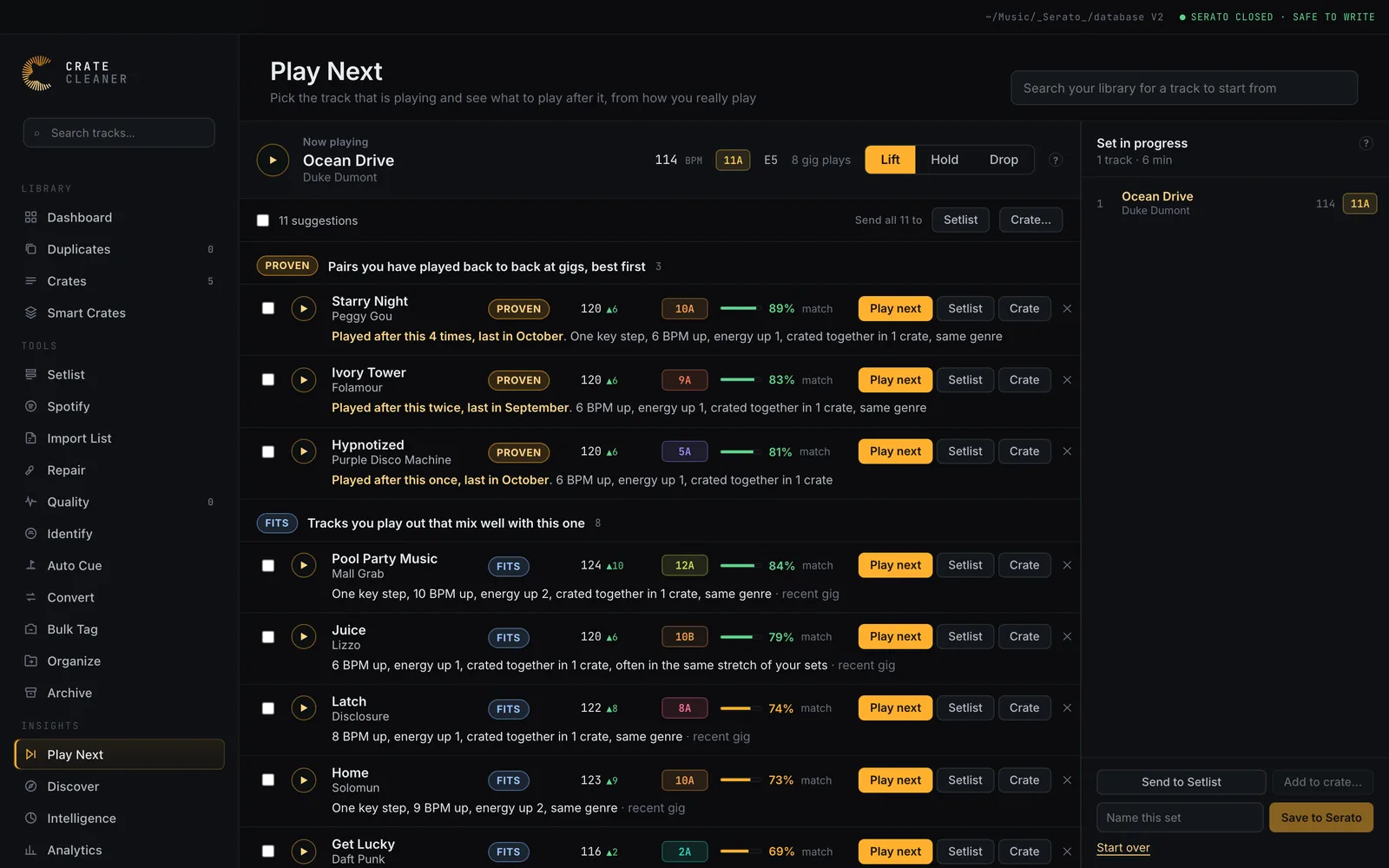
Pick the track that is playing and Crate Cleaner lists what fits after it, ranked from how you really play: the records you have played back to back at gigs, the crates you file together, the same riddim or artist, tempo, key and energy. Every suggestion says why it is there. Choose Lift, Hold or Drop, chain picks into a set, and save it to Serato in order.
Demo
Watch a set build from one track
Proven follow-ups from twenty nights of Serato history come first, Lift keeps only tracks that push the room, three picks chain into a set that saves to Serato in order, and Discover finds the tracks that never got played.
Suggestions
Ranked from your own gigs, with the reason on every pick
Most next-track tools only compare BPM and key. Crate Cleaner starts from what you have actually done. Suggestions come in groups, and each row spells out what it shares with the track that is playing, so you can judge a pick at a glance instead of trusting a number.
- Proven: tracks you have played right after this one at gigs, with how often and when you last did
- Fits: tracks you play out that mix well with this one but have not been paired yet
- Plain reasons: “played after this 4 times, last in October”, “one key step”, “6 BPM up”, “crated together in 2 crates”, “same riddim”
- Match score out of 100, kept apart from the BPM so the two are never confused, and Camelot keys in their wheel colours
- Preview any suggestion with its play button before you send it anywhere
Direction
Lift, Hold or Drop the room
Decide where the set goes first, then pick from tracks that go that way. The three lists really differ: Lift and Drop are filters, not a nudge to the ranking.
Only tracks that take it up
Faster, more energy, or records you usually play later in the night. Use it when the floor is ready for more.
Keep the level
Similar tempo and energy, and tracks you play at a similar point in the night. For riding a groove that is working.
Only tracks that bring it down
Slower, less energy, or records you play earlier in the night. For a breather, a reset or the last hour.
Your style
It learns how you mix, not how DJs are told to
Plenty of DJs mix tightly on tempo and loosely on key. Others live on the Camelot wheel. With your Serato history imported, Crate Cleaner works out how much key really matters in your own transitions and weights it to match, so a DJ who rarely mixes in key is not buried in harmonic suggestions. It also learns where in the night you play each track, which is how Lift and Drop know a warm-up record from a peak-time one.
- Crates count: tracks you file together are tracks you play together
- Riddims and artists: a same-riddim or same-artist follow-up gets credit
- Half and double time: a 70 BPM track can follow a 140 BPM one
- Not this: dismiss a suggestion and it is never offered after that track again
Build a set
Chain picks into a set as you go
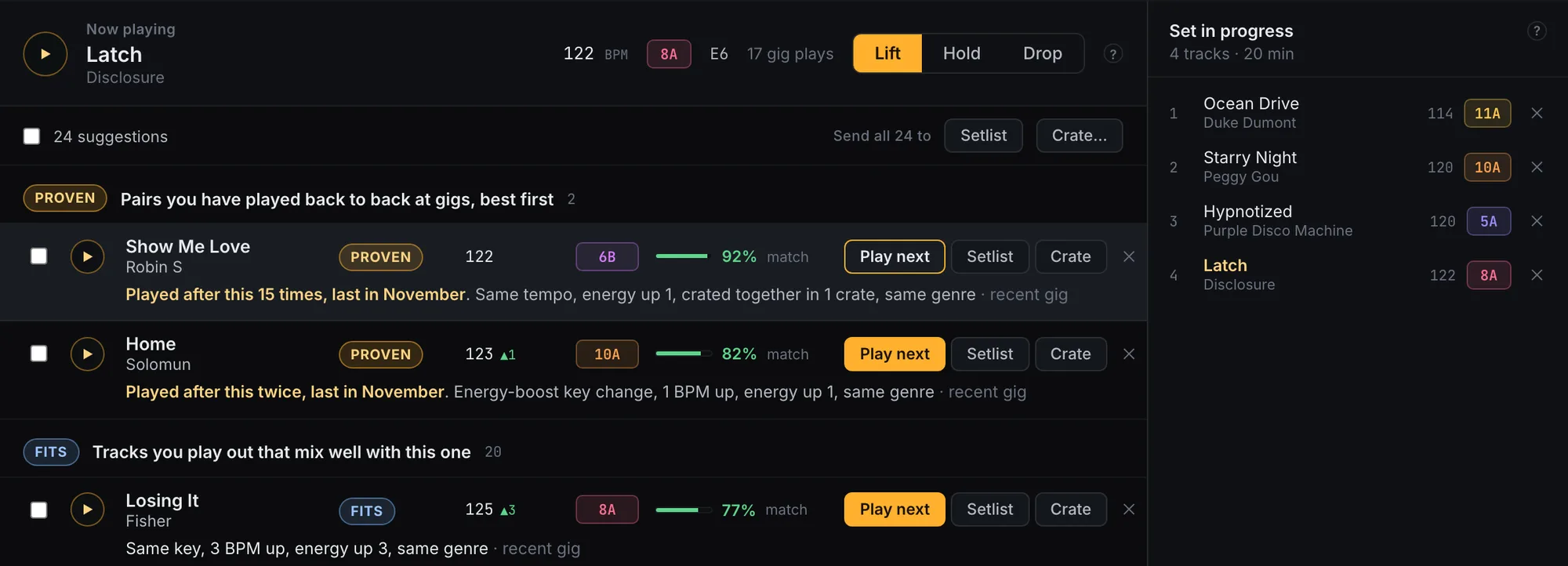
Click Play next on a suggestion and it joins the set in progress, then the suggestions follow it. Go back to any earlier track to branch off in another direction. When the set looks right, send it where you need it.
- Send one track, the ones you tick, or the whole list to the Setlist page or to a crate
- Save to Serato in order as a new crate, ready on your decks (Pro and Studio)
- Running length of the set shows as it grows
Discover
Get the tracks you never play into rotation
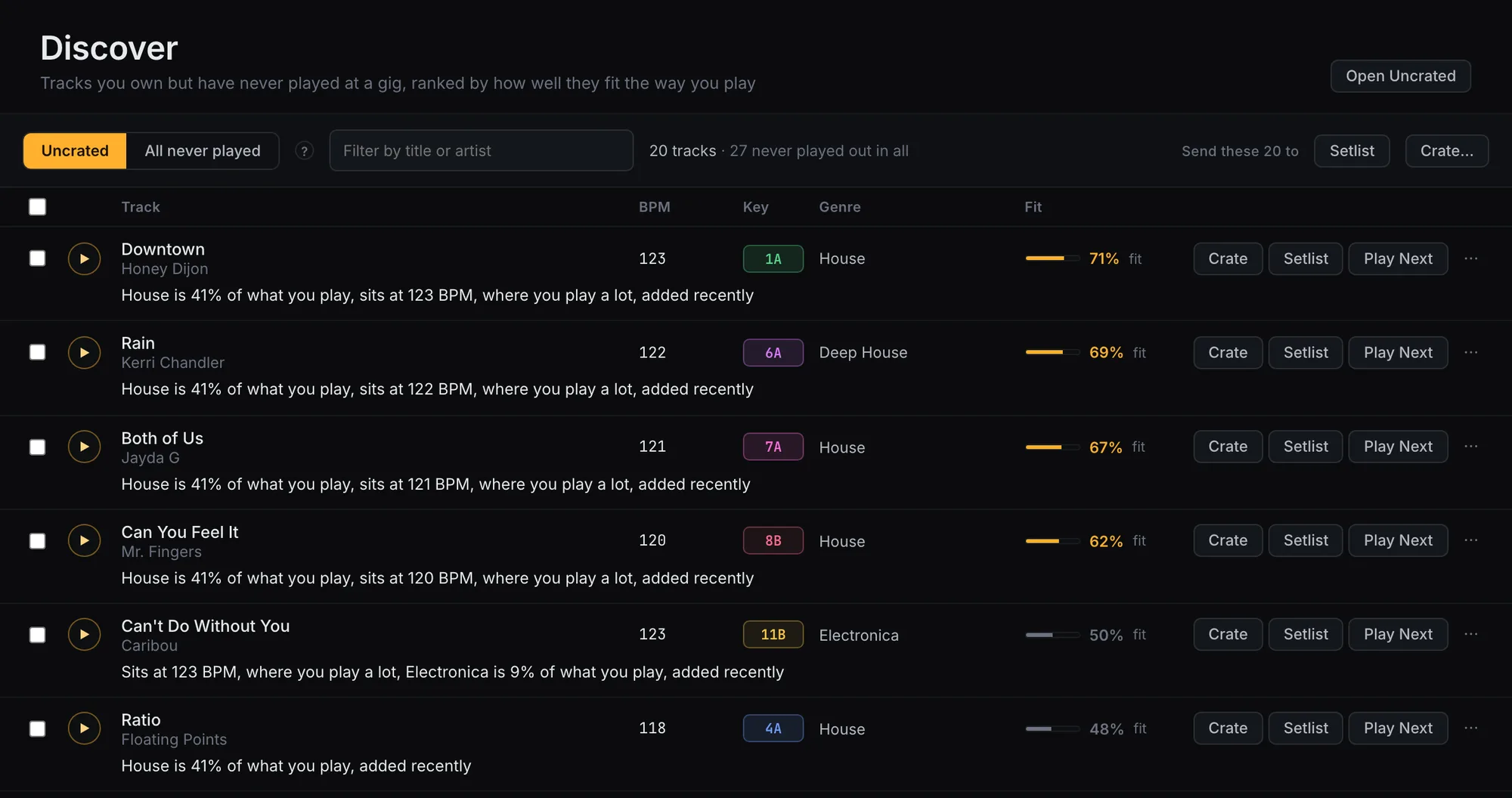
A big library is mostly music that has never been played out. Discover lists the tracks you own but have never played at a gig, ranked by how well they fit the way you play: the tempos you sit at, and the genres, artists and riddims you play most. The top of the list is worth a listen tonight, instead of the same twenty safe records.
- Uncrated shows only never-played tracks in no crate, so filing one takes it off the list
- All never played adds the crated tracks you have not played out yet
- A reason on every row: “House is 41% of what you play, sits at 123 BPM, added recently”
- No history yet? Discover builds your profile from what you have filed in crates instead
- Open any track in Play Next to see what it mixes with, or send it to a crate or the Setlist
How it works
Pick a track, choose a direction, build the set
- Pick the track that is playingSearch for it, or right-click any track in Crate Cleaner and choose What to Play Next.
- Choose a directionLift, Hold or Drop. Each suggestion shows its match score and the reasons behind it.
- Chain the setClick Play next to add a pick and see what fits after it. Send the set to a crate or the Setlist page, or save it to Serato in order.
For suggestions from your gigs, import your Serato history once on the Analytics page. Crate Cleaner rebuilds what it knows every time you import again.
Plans
What the free plan covers
Play Next and Discover are on every plan. Free gets the Fits suggestions, Lift, Hold and Drop, Discover, and sending tracks to a crate or to the Setlist page (which holds 10 tracks on Free). Pro adds suggestions from your gig history, the Proven group and night position, and saving a set to Serato in order. Energy levels come from Track Intelligence on Studio; without them, Lift and Drop go by tempo and where in the night you play each track.
FAQ
Questions about Play Next and Discover
Do I need to import my Serato history?
Does it only suggest tracks in key?
What do Lift, Hold and Drop do?
Where do the energy levels come from?
Does Play Next read what is loaded on my Serato decks?
What is Discover?
Does it change my files or my Serato library?
Is my library uploaded anywhere?
Is Play Next free?
See what your history says to play next
Play Next and Discover are free on every plan. Pick any track and see what fits after it.
Crate Cleaner is Mac only today. Join the Windows beta list and we’ll email you when it opens.
Crate Cleaner runs on your Mac. Send yourself the link for when you’re back at it.
Keep reading