How do DJs know what song to play next?
Most DJs don’t pick the next song from their whole library. They shrink the choice long before the gig, then decide between a handful of tracks using a few quick checks: tempo, key, which way the energy should go, and what has worked after this record before. Here is the routine, and how to run it in Serato DJ Pro.
The routine, in the order DJs actually use it
-
Know where the playing track goesBefore you look for anything, know how the current track ends: how long the outro runs, whether it breaks down or slams out, and how much time you have. That decides whether you need a long blend or a quick cut.
-
Pick from a shortlist, not the libraryBuild crates by job before the gig: openers, builders, peak records, closers, and a few safe floor-fillers. Mid-set you only scroll one crate. See how to organize Serato crates.
-
Stay inside a tempo windowMost next tracks sit within a few BPM of the one playing, so the pitch change stays small. Remember half and double time: a 70 BPM track can follow a 140 BPM one.
-
Check the keySame key, or one step around the Camelot wheel, blends without clashing. It matters most on long blends with melody. On a quick cut or a drum intro it matters much less. The Camelot wheel tool shows the safe moves.
-
Decide the direction: lift, hold or dropAsk whether the room needs more, the same, or a breather, and move about one energy level at a time. A drop is fine when you mean it. See DJ set energy levels.
-
Lean on what worked beforeYour history knows which records you have played back to back and how they went. Pairs that worked once are a safe bet again. See how to read your Serato history.
-
Keep two options loaded, then watch the floorHave a first choice and a backup in mind before the mix-out starts. If the floor thins, switch to the backup instead of searching.
Why choosing the next song feels hard
The hard part is not the mixing. It is looking at thousands of tracks with a minute to spare. A big library is mostly music you have never played out, and scrolling it mid-set is how DJs end up playing the same twenty safe records every night.
The fix is to make most of the decision before the gig. Crates by job cut the library to a few dozen tracks. Inside a crate, tempo and key cut it to a handful. Energy direction and your own history pick the one.
Tempo, key or energy: which matters most?
It depends on the DJ and the music. Many DJs mix tightly on tempo and loosely on key: almost every transition is within a few BPM, but only some are in key. Others build whole sets around the Camelot wheel. Neither is wrong. What matters is knowing which one you actually rely on, so you check that first and treat the rest as tie-breakers.
Energy is the one most often skipped. Two tracks can share a tempo and a key and still feel completely different: one a stripped-back groove, the other a peak-time anthem. Choosing the direction first (more, same or less) stops a set from lurching.
How to do it in Serato DJ Pro
- Sort the crate by BPM, then by key. Click the column headers. Tracks near the playing tempo sit together, and the key column shows which of them match.
- Park candidates in the Prepare panel. Drag three or four possible next tracks there during the set, so you are choosing from a short list. See how the Prepare panel works.
- Check your history. The History panel shows what you played and in what order, so you can see what followed a track at past gigs. Your most played tracks tell you which records reliably work.
- Use smart crates for tempo bands. A smart crate with a BPM range keeps a shortlist up to date as you add music. See how to set up smart crates.
Serato does all of this by hand: it shows you the columns, and you do the comparing.
Let Crate Cleaner suggest the next track
Crate Cleaner’s Play Next page does that comparing for you. Pick the track that is playing, choose Lift, Hold or Drop, and it lists the tracks in your library that fit after it, each with the reasons spelled out: shared crates, the same riddim or artist, tempo, key and energy. Send one track, the ones you tick, or the whole list to your Setlist or a crate, and chain picks into a set as you go.
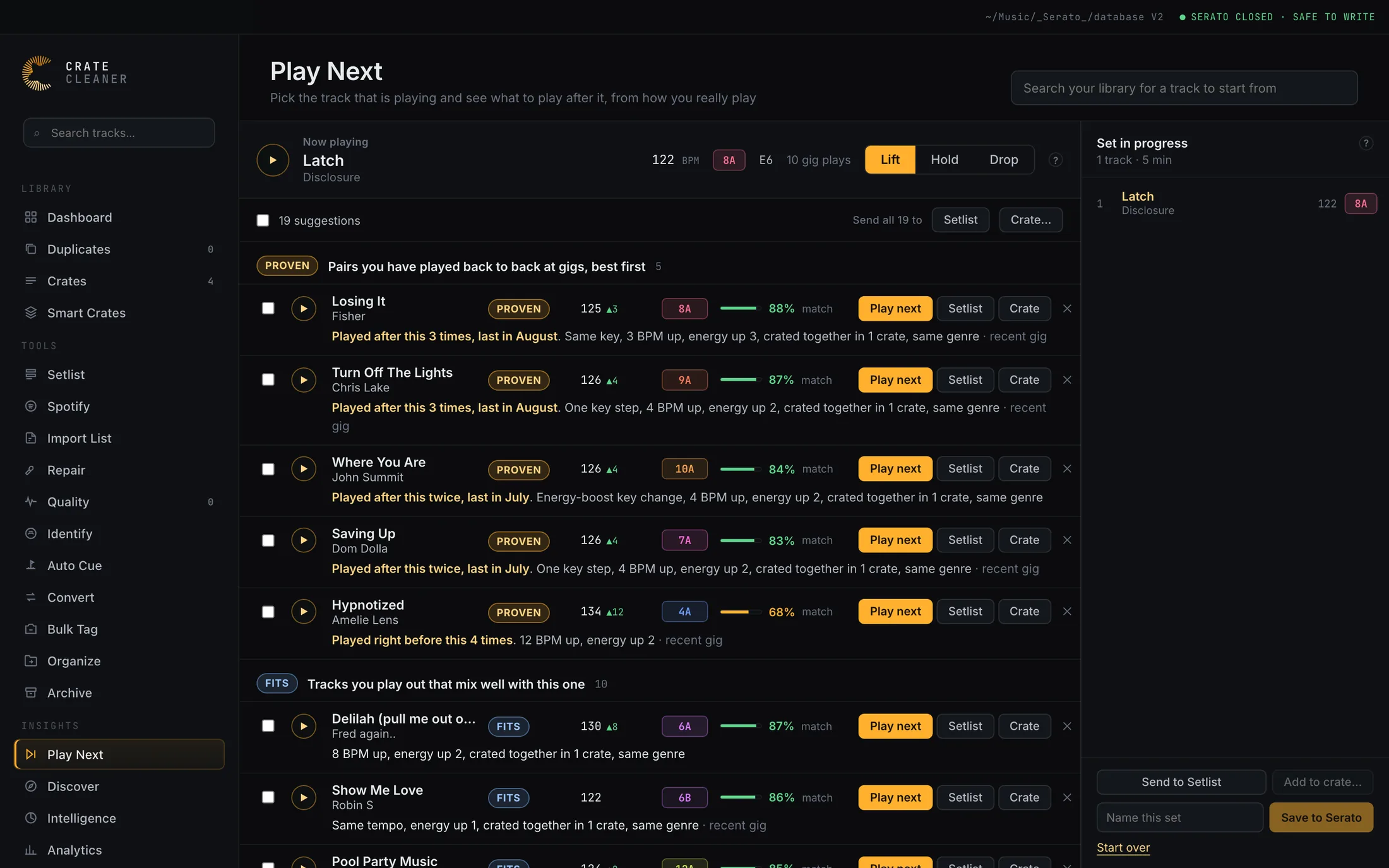
Play Next is on every plan. On Pro and Studio it also learns from your imported Serato history: the pairs you have played back to back come first, and Lift and Drop know where in the night you usually play each track. Energy scores come from Track Intelligence on Studio. Without them, Lift and Drop go by tempo and, with history, by where in the night each track usually lands.
The same page has Discover: tracks you own but have never played out, ranked by how well they fit what you really play. It is a quick way to get new records into rotation instead of the same twenty.
Watch Play Next pick the next track
Pick the track that is playing and Play Next ranks proven follow-ups from your own Serato history, Lift keeps only tracks that push the room, and the set saves to Serato in order.
FAQ
Do DJs plan every song in advance? Most don’t. Many prepare crates and a rough shape for the night, then choose track by track from those crates based on the room. Fully planned sets are more common for short slots, livestreams and events with a fixed running order.
How many next songs should I have ready? Two is a common habit: a first choice and a backup that takes the set somewhere else if the floor doesn’t respond. More than that and you are back to scrolling.
Does the next song always have to be in key? No. Key matters most on long, melodic blends. A short cut, a drum intro or an a cappella moment hides a key change. Plenty of DJs mix in key only some of the time.
What do Lift, Hold and Drop mean in Crate Cleaner? They are filters on the Play Next list. Lift shows only tracks that take the set up (faster, more energy, or ones you usually play later in the night). Drop shows only tracks that bring it down. Hold keeps it level.
Can software pick the next song for me? It can shortlist. Crate Cleaner ranks the tracks that fit and shows why, but it cannot see the room. Use the list to save time and choose with your ears.
Find what fits after any track
Play Next ranks the tracks in your library that fit after the one playing, with Lift, Hold and Drop. Free plan, no card required.