How do you set up smart crates in Serato?
A smart crate fills itself from rules instead of being built by hand: set a condition like BPM between 120 and 126, or Genre is House, and Serato collects every matching track, updating live as your library grows. They are one of the most underused tools in Serato. This guide shows how to set them up, which rules are actually worth using, the common reasons a smart crate comes up empty, and where they stop short if you mix harmonically.
Set up a smart crate
- Add a smart crateIn the crates panel, click Add Smart Crate. A rules window opens where you define what the crate collects.
- Add your first ruleClick Add Rule and pick a field: BPM, Key, Genre, Artist, Album, Comment, Label, Remixer or Added date. Set the condition and value.
- Add more rules and choose how they combineAdd as many rules as you need. Tick Match all of the following rules so a track must meet every rule, or leave it unticked so meeting any one rule is enough.
- Turn on Live UpdateTick Live Update so the crate refills automatically as your library changes, instead of freezing at the moment you made it.
- Save and name it clearlySave the crate with a name that describes the rule, like House 120 to 126, so you know what it contains at a glance.
- Combine smart crates with good tagsSmart crates are only as good as your metadata. Keep Genre, Comment and Grouping tidy so the rules have something reliable to match.
What a smart crate is, and is not
A regular crate is a manual playlist: you drag tracks in and they stay until you remove them. A smart crate is a saved query. You define rules, and Serato shows every track that matches. Turn on Live Update and the crate keeps itself current, so a smart crate for Added in the last 30 days always shows your newest imports without you touching it.
The catch is that smart crates sit in their own area and do not nest as subcrates, so they complement a manual crate structure rather than replacing it. For the manual side, see how to organize your Serato crates.
The rules worth using
- BPM ranges for building tempo-banded crates: 120 to 126 for peak house, 90 to 100 for hip hop. This is the single most useful smart-crate rule for open-format DJs.
- Key for pulling everything in a given key, though see the harmonic limitation below.
- Added date for a rolling New Music crate.
- Genre, Label or Comment for style or energy tags you maintain yourself.
Combine two or three with Match all of the following rules ticked for something like House, 122 to 126, added this year. Just do not over-constrain: with that box ticked, every extra rule shrinks the result, which is the most common reason a smart crate comes up empty.
Why your smart crate is empty or not updating
Two usual causes. First, Live Update is off, so the crate froze when you made it. Second, the rules do not match anything, often because Match all of the following rules is ticked and the conditions together are too tight, or because the tags the rules depend on are blank. A BPM rule needs analyzed tracks, and a Genre rule needs the Genre field filled in. If your BPM or key data is unreliable, fix that first: see how to analyze BPM and key in Serato and fixing a halved or doubled BPM.
Where Serato smart crates stop short
Serato smart crates are filters. They match on fields that already exist, but they cannot rank tracks by energy or danceability, and they cannot sequence a set into harmonic transitions, because Serato does not store those things. So you can pull every track in 8A, but not order them into a smooth energy build with compatible key changes.
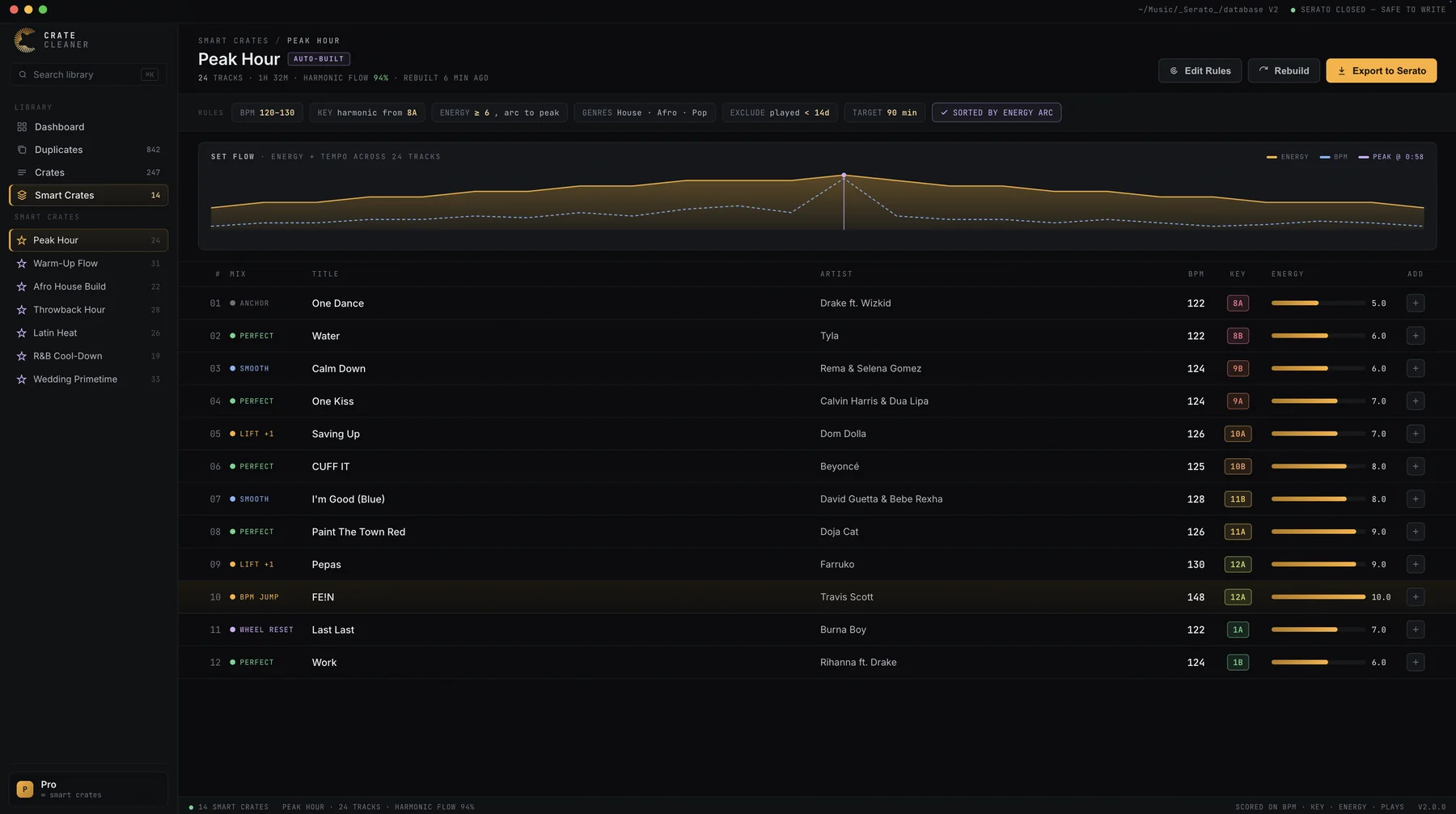
That is the gap Crate Cleaner fills. Its Smart Crates add energy on top of BPM and key, using the energy data from Track Intelligence, and order the crate for smooth transitions in both tempo and key, so the crate is not just a filtered list but a playable order. Each track shows why it fits. It runs on your real Serato library on macOS with a free plan and no card required: the first Smart Crate template is free, and every template plus the export back to Serato are on Studio. If you mix in key, pair this with harmonic mixing with the Camelot wheel.
Try Crate Cleaner free → · See pricing →
FAQ
What is the difference between a smart crate and a regular crate? A regular crate is a manual list you drag tracks into. A smart crate fills itself from rules you set, such as BPM between 120 and 126, and with Live Update on it keeps updating as your library changes.
Can smart crates go inside other crates? Smart crates live in their own area and cannot be nested as subcrates the way regular crates can. You can build several smart crates, but they do not form the folder hierarchy that manual crates do.
Why is my smart crate not updating? Either Live Update is off, or no tracks match the rules. Check whether Match all of the following rules is ticked, since requiring every rule is easy to over-constrain, and confirm the tags the rules depend on are actually filled in.
Can Serato smart crates sort by energy or build harmonic sets? No. Serato smart crates match on existing fields like BPM and key but cannot rank by energy or order tracks for harmonic transitions. Crate Cleaner's Smart Crates add energy and order the crate for smooth tempo and key transitions.
Build crates that play in order
Crate Cleaner's Smart Crates add energy to BPM and key and order the crate for smooth transitions. First template free on your real library.