How do you prepare your Serato library before a gig?
A set goes wrong on the details nobody checked: a file that will not load, a fake 320 that turns to mush on the club system, two copies of the same track, an explicit edit at a wedding. A pre-gig routine catches all of it before you leave the house. Analyze every track so the deck never stalls, confirm the files still exist, check for fake bitrates, clear duplicates out of the set, verify your cues survived, and make sure each track is the version the room booked. Then the only job left in the booth is reading the crowd.
The pre-gig checklist for a Serato set
- Analyze every track in the setOpen Serato DJ with no hardware connected to enter Practice or Offline mode, select the crate, and drag it onto Analyze Files. This builds BPM, key and the waveform overview. An unanalyzed track can stall the deck the moment you load it, which is the last thing you want mid-transition.
- Confirm every file still existsFiles you moved, renamed or deleted since the last session show as missing, usually a greyed-out row or an exclamation mark. Relink them at home. A missing file is a silent hole in your set until the second you try to load it.
- Check for fake bitratesA file tagged 320 kbps that was re-encoded from a 128 sounds thin and splashy on a club system even though it looks fine on a laptop. Spot-check a suspect track's spectrogram in a free tool like Spek, or scan the whole crate for transcodes at once.
- Clear duplicates out of the setTwo copies of the same track in one crate waste a slot and make you second-guess which to grab. Keep the higher-quality file, the one with your cues, and drop the stray.
- Verify cues, loops and beatgridsOpen a few key tracks and confirm your hot cues and beatgrid are where you left them, especially after any tag edit, format conversion or file move, all of which can strip Serato markers if the tool was not Serato-aware.
- Check the version for the roomA wedding or corporate gig needs clean edits; a club can take explicit. Confirm each track is the version the booking calls for, and that you are not about to drop a radio edit where you wanted the extended mix.
Why a pre-gig routine is worth the ten minutes
Every failure on that list has one thing in common: nothing warns you until the track is already on the deck, in front of the room. Serato will happily show a crate that looks complete and let you walk out the door with a missing file, a transcode and a duplicate hiding in it. The point of a routine is to move all of those discoveries to your kitchen table, where fixing them costs nothing.
The five things that quietly break a set
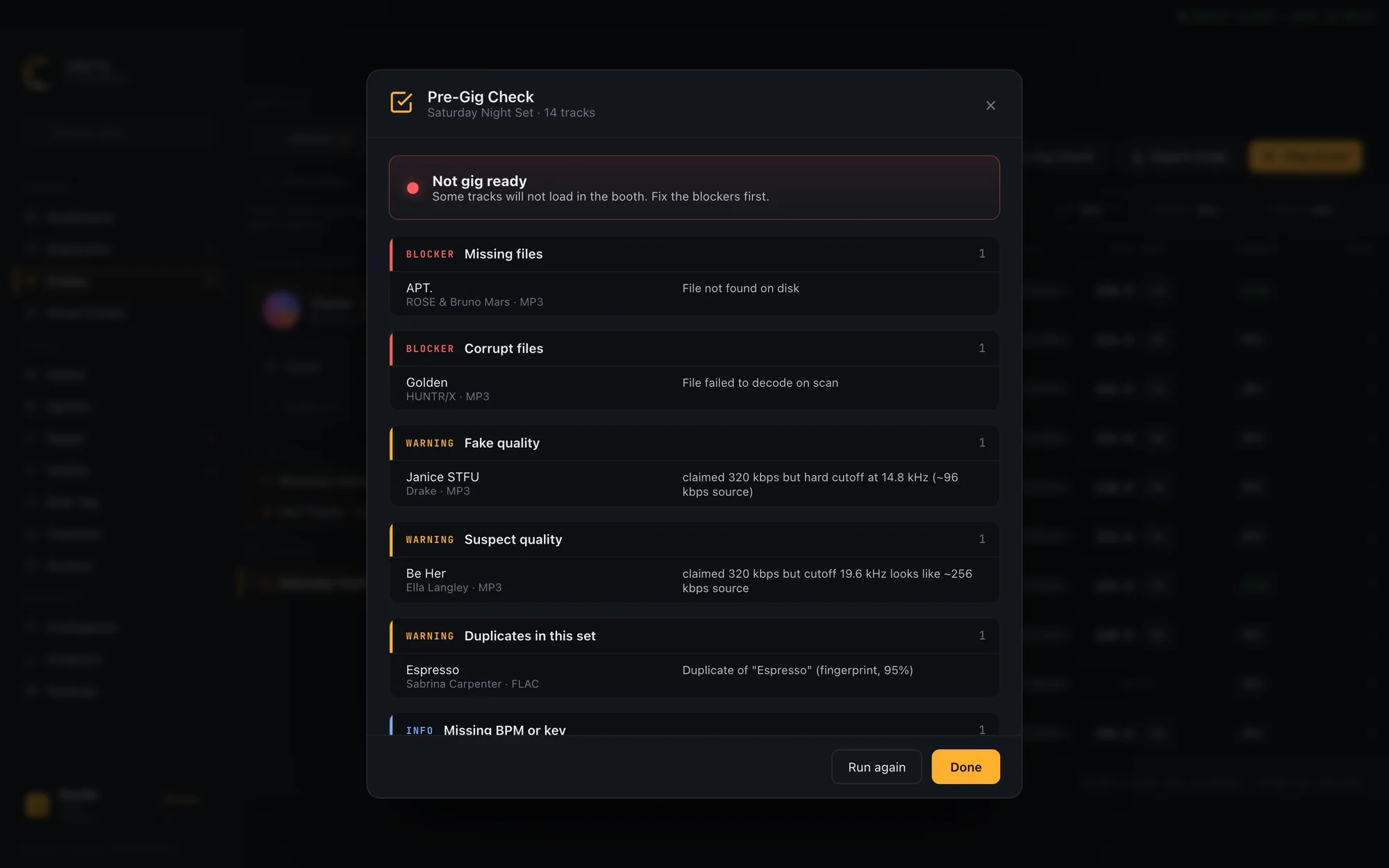
- Missing files. Moved or renamed since you built the crate. The deck shows an error instead of loading.
- Corrupt files. A bad download or interrupted copy that fails to decode. Rare, but fatal when it is the track you cued next.
- Fake 320s and fake lossless. Upscaled from a lower bitrate. They pass on headphones and fall apart through a club rig.
- Duplicates. Two versions of one song in the same crate, so you grab the wrong one under pressure.
- The wrong version. An explicit edit at a family event, or a radio cut with no intro where you needed room to mix.
Analyze at home, never in the booth
Serato's analysis reads every file to build its waveform, BPM and key, and it is the single most important thing to do before a gig. Run it with no hardware connected so Serato opens in practice mode, select your whole library or just the gig crate, and drag it onto Analyze Files. Tracks analyzed once stay analyzed. If you skip it, the first load of an unanalyzed track makes the deck do that work live, and on a big library that pause is long enough to notice.
The version question: clean or explicit
For a wedding, a corporate party or any all-ages room, one explicit track can end the booking. The problem is that Serato has no idea which of your files are clean. The reliable signals are the version words in a title (clean, dirty, explicit, radio edit) and, if a track came from a streaming playlist, the platform's own explicit flag. Build the habit of confirming the edit before the gig, not discovering it when the chorus lands. The wedding-specific workflow is in how to find and remove explicit songs in Serato. For a full wedding timeline, from six weeks out to the day itself, see the printable wedding DJ checklist.
Doing the whole checklist in one click
The manual routine works, but it is six passes through your library with six different tools. Crate Cleaner's Pre-Gig Check runs all of it against a crate in a single click: it flags missing and corrupt files as blockers, fake and suspect bitrates and in-set duplicates as warnings, and unanalyzed tracks and explicit versions as info, then gives you one gig-ready verdict. It reads what the app's quality scan and duplicate finder already found, so nothing is re-scanned, and when an explicit track has a clean version in your library it names the swap. Nothing is written; it only reports.
Frequently asked questions
How long before a gig should I prep my library?
Do the analysis and file check the day before, not an hour before. Analyzing a large library or relinking missing files takes time you do not want to be spending while you should be loading in. The version and cue checks can happen any time you are building the crate. On the night, the Prepare panel holds your next few tracks, but it empties when you quit, so keep the set itself in a crate.
Does Serato tell me if a file is missing?
Partly. Serato marks a missing file with an exclamation mark or a greyed row once it tries to show it, but it will not proactively warn you that a crate you are about to play has a missing track in it. You have to look, or scan the crate with a tool that checks for you.
What is a fake 320 and why does it matter at a gig?
A fake 320 is a file tagged 320 kbps that was actually encoded from a lower-bitrate source, so the high frequencies are gone. On laptop speakers it can pass, but on a club system the missing top end makes cymbals splash and the track sound flat next to a real file. Gigs are exactly where it shows.
Can I check a whole crate at once instead of track by track?
Yes. Doing it by hand is one pass per issue, but a Serato-aware tool can audit an entire crate in one action, reporting missing files, corruption, fake bitrates, duplicates and explicit versions together. That is what Crate Cleaner's Pre-Gig Check does.
Should I play clean or explicit versions at a wedding?
Clean, unless the couple has explicitly said otherwise. Weddings, corporate events and all-ages rooms expect clean edits, and a single explicit track can cost you the booking. Confirm the version of every track before the event.
Check your whole crate in one click
Crate Cleaner audits a Serato crate for missing files, fake bitrates, duplicates and explicit versions before you play. Free plan on your real library.