How do you find and play clean versions of songs as a DJ?
Clean, radio-edit versions exist for exactly this, and buying them is the easy part: a DJ record pool or a store's clean listing has them. The hard part is knowing which of the thousands of files already in your library are clean, and making sure the explicit one never reaches the speakers at a family gig. So buy the clean edit, tag it so you can tell it apart, and use a filter that hides every explicit track from the crate before you play, rather than trusting yourself to remember mid-set.
How to source and play clean versions
- Buy clean edits from a DJ record poolServices like DJcity and BPM Supreme carry clean, dirty and radio-edit versions of current tracks, labeled clearly, made for exactly this problem. A record pool is the single most reliable source of clean edits for working DJs.
- Look for Clean or Radio Edit in storesOn iTunes, Apple Music and Beatport, look for a version marked Clean or Radio Edit. Radio edits are censored for airplay so they are almost always clean, but check the label before you buy, because an Explicit tag means the profanity is still there.
- Tell the clean and explicit versions apartThe version usually lives in the title: Clean, Dirty, Explicit or Radio Edit. If the track came from a streaming playlist, the platform's own explicit flag is the authoritative signal, because it is set by the label rather than guessed from a filename.
- Flag every explicit track in your libraryGuessing mid-set is how the wrong track gets played. Mark every explicit track up front, from title tokens and from streaming data, so the status is visible before you ever load a file.
- Filter the whole set to clean before you playRather than avoiding explicit tracks by memory, hide them. Filter the crate so every flagged-explicit track drops out, and the set you carry into the booth is clean-event-safe by construction.
- Own the clean version of every peak-time recordThe tracks most likely to carry explicit lyrics are often the ones you cannot skip at peak time. Make sure you own the clean edit of those first, so you are never forced to choose between the record and the room.
Why clean versions matter more than DJs expect
For a club at midnight, explicit is fine and often the point. For a wedding, a corporate party, a school event or any all-ages room, a single explicit track can end the booking and cost you the referral. Parents, venue staff and the person who hired you all notice the one word you did not catch, and they remember it. Clean-event work pays well precisely because it demands this discipline, so the DJs who master it get re-booked. For the wedding version of this problem, see how to find and remove explicit songs in Serato.
Where to actually get clean versions
- DJ record pools. DJcity, BPM Supreme and similar services carry clean, dirty and radio edits side by side, clearly labeled. The best source for current music.
- Stores, via radio edits. iTunes, Apple Music and Beatport list clean or radio-edit versions of most hits. Radio edits are censored for airplay, so they are almost always clean.
- Clean compilation albums. A fast, cheap way to fill out a wedding collection, since many are entirely clean by design.
The real problem: which files you already own are clean
Sourcing a clean edit once is easy. The trouble starts after years of downloads, when your library holds thousands of tracks and Serato has no field that says clean or explicit. Titles are inconsistent, tags are often blank, and the explicit version and the clean version can sit two rows apart looking identical. You cannot filter on information you never captured, which is why the answer is to record the clean-or-explicit status of every track, once, and then filter on it.
The two reliable signals
There are only two trustworthy ways to know a file's status. The first is version tokens in the title or filename: clean, dirty, explicit and radio edit are the words that mean something. The second, and stronger, is a streaming platform's explicit flag. When a track in a Spotify playlist matches a file you own, that official flag can transfer to your file, and because it is set by the label rather than inferred, it catches the explicit tracks whose titles say nothing at all. Together they cover almost everything.
Filtering a whole crate to clean in one click
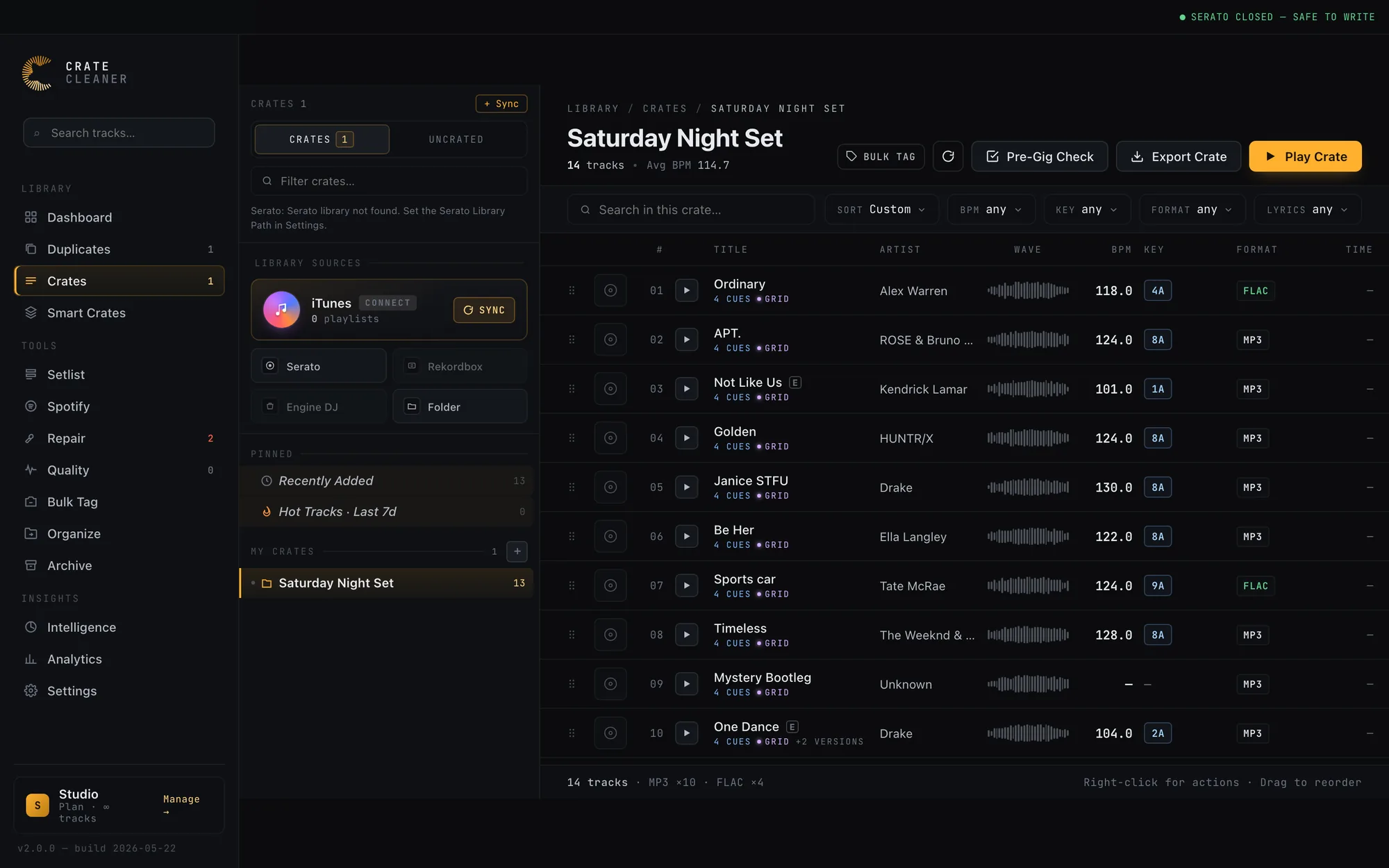
Crate Cleaner captures both signals automatically and turns them into a filter. It flags every track from Spotify's explicit data and from your titles, marks explicit tracks with an E badge, and gives the crate a clean-event mode that hides every explicit-flagged track in one click. It also groups the clean and explicit versions of a song into a family, so when you do own the clean edit of an explicit track, the Pre-Gig Check names it and the swap is a single decision. Your files are never changed; the status lives in the app and the filter only changes what the crate shows.
Frequently asked questions
What is a clean version or radio edit?
A clean version has the profanity and explicit content removed or edited so the track is suitable for airplay and all-ages rooms. A radio edit is usually both shortened and cleaned for radio, so radio edits are almost always clean, though you should still check the label.
Where can I download clean versions of songs?
DJ record pools such as DJcity and BPM Supreme are the most reliable source and label clean, dirty and radio edits clearly. iTunes, Apple Music and Beatport also list clean or radio-edit versions of most hits, and clean compilation albums are a cheap way to build a wedding collection fast.
How do I tell if a song file is the clean version?
Check the title for clean, dirty, explicit or radio edit. If the track came from a streaming playlist, the platform's explicit flag is more reliable because the label sets it. A tool that reads both signals can mark every file for you so you do not have to check by hand.
Can I filter out explicit tracks in Serato?
Serato has no built-in clean or explicit field, so not on its own. You need a tool that flags each track's status and then lets you hide the explicit ones. Crate Cleaner adds an explicit flag from streaming data and titles and a clean-event filter that hides them from the crate.
Should a wedding DJ ever play explicit songs?
Only if the couple has clearly asked for it. The default for weddings, corporate events and all-ages rooms is clean edits, because a single explicit track can offend guests and cost you the booking. Confirm the version of every track before the event.
Filter any crate to clean-event-safe
Crate Cleaner flags every explicit track from Spotify and your titles and hides them in one click. Free plan on your real Serato library.